Bridging The Gap: Netflix’s Non-Fiction Industry Engagement Event
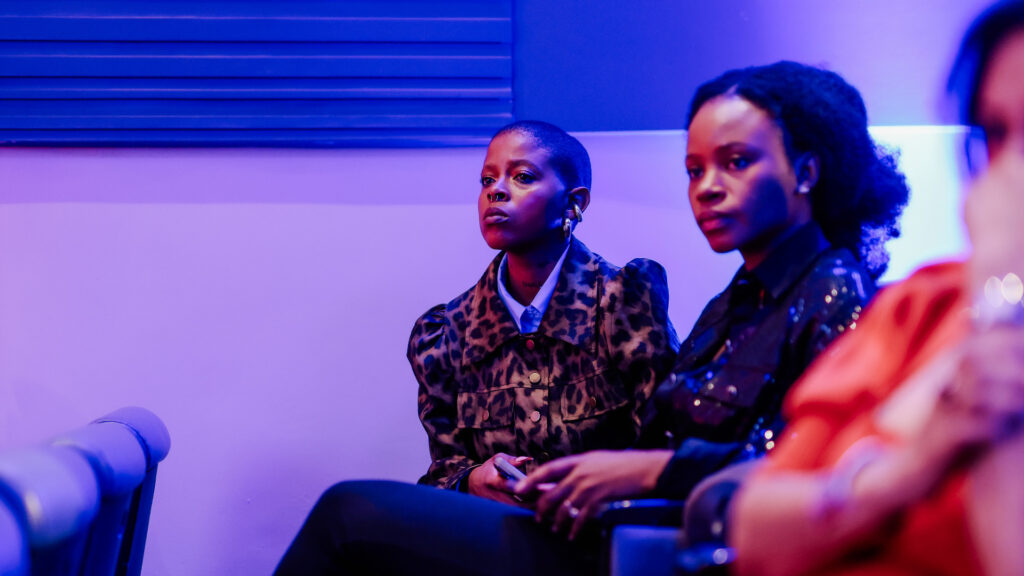
The Netflix Nonfiction Industry Engagement Event was a groundbreaking two-day workshop that brought together TV production executives, showrunners, and industry thought leaders to explore the evolution of storytelling in nonfiction. From deep dives into creative execution to practical insights on workflow and project setup, the event provided an invaluable look into Netflix’s approach to unscripted formats, docu-soaps, and documentary series.
Leading Through Change: How I Keep My Creative Team Energised in a Year of Constant Pivots

Leading Through Change: How I Keep My Creative Team Energised in a Year of Constant Pivots This year has been one of the most pivotal for me and for Black Rose Creative Lab. When I started this journey, we were primarily TV content producers, working on traditional shows and formats. But the industry doesn’t stand still and neither can we. Over the past year, we’ve evolved into a concept-first content and creative studio,developing broadcast-ready original IP formats for brands, broadcasters, and platforms, while still pitching new TV shows and servicing our clients. It has been exciting. It has been terrifying. And it has been a crash course in adaptability. Small creative agencies like ours are constantly in motion—pivoting, shifting strategies, chasing new opportunities, nurturing existing clients, and adjusting business development tactics on the fly. The challenge isn’t just keeping up with the demands of the industry; it’s keeping your team grounded in the vision when the ground beneath you is constantly moving. My team and I work across multiple platforms, genres, and formats. This means we can be deep in storyboarding a documentary on Monday, prepping a pitch for a broadcaster on Tuesday, and building a branded digital series by Thursday. The constant change is exhilarating, but it can also be draining if we don’t stay intentional about how we work together. I’ve learned that my job as a leader isn’t just to steer the ship—it’s to keep the team energised, aligned, and believing in where we’re going, even when the seas are rough. Over time, I’ve found five core principles that help me do that. Founder’s NotesSive Nkukwana, Chief Creative Director Create a Culture of Creative Safety I’ve seen the most brilliant ideas die in rooms where people felt unsafe to speak up. In creative work, vulnerability is a superpower—but it only comes out when people know they won’t be judged for throwing out a wild, messy, or half-baked thought. At Creative Lab, we have “no wrong ideas” moments where everything is welcomed before we start refining. This has led to some of our most unexpected—and most successful—concepts. Try This: Start team check-ins with a 10-minute “creative free-for-all” where the wildest, weirdest ideas are encouraged without critique. Keep the ‘Why’ Front & Center Creatives aren’t just working for a paycheck—they want to be part of something meaningful. A team that understands the deeper purpose behind their work creates with greater passion and clarity. When you’re producing at speed, it’s easy to get lost in the deliverables and lose sight of why you’re doing it. Creatives work better when they know the purpose behind their work. Regularly remind your team of the bigger vision. I make it a point to remind my team who we’re creating for and the difference our work can make. Whether you’re producing a TV show, designing a campaign, or creating digital content, connect their work to the impact it has. Show real audience reactions, testimonials, or cultural shifts influenced by their work. Sometimes it’s just pausing to say: “This matters. Here’s why.” Try This: Hold monthly “vision check-ins” where you discuss how the project is evolving, why it matters, and how each member’s contributions shape the bigger picture. Balance Structure with Creative Freedom Creatives need structure—but not the rigid kind that stifles innovation. The key is to provide frameworks that guide without restricting. Use structured creative sprints with clear objectives and deadlines while allowing flexibility in execution. For example, Netflix’s content teams follow a freedom & responsibility model—creative teams operate autonomously but with clear accountability. Try This: Set clear expectations and outcomes, but allow your team to decide how they’ll achieve them. Instead of micromanaging, focus on empowering. Prioritise Creative Well-being Burnout is real in the creative industry. When creativity is your currency, mental fatigue can drain even the most passionate creators. Introduce “creative recharge” sessions—whether it’s a mindfulness break, a walk-and-talk brainstorming session, or a creative field trip to reignite inspiration. Podcasts like The Creative Pep Talk by Andy J. Pizza offer invaluable insights on staying creatively energized. Try This: Encourage team members to take creative wellness breaks—watch a film, visit an art exhibit, or simply step away from the screen to reset. Celebrate Wins—Big and Small Creatives pour themselves into their work, and yet often, recognition only comes at the very end—if at all. I’ve learned that celebrating the small moments fuels momentum just as much as the big milestones. Acknowledge both the small victories (a well-crafted script draft, a breakthrough visual concept) and the major milestones. Go beyond generic praise—be specific. Instead of “great job,” say, “Your treatment shifted the entire pitch in a better direction.” Specific praise makes people feel truly seen and recognition fuels motivation. I’ve seen the most brilliant ideas die in rooms where people felt unsafe to speak up. In creative work, vulnerability is a superpower—but it only comes out when people know they won’t be judged for throwing out a wild, messy, or half-baked thought. At Creative Lab, we have “no wrong ideas” moments where everything is welcomed before we start refining. This has led to some of our most unexpected—and most successful—concepts. Try This: Start team check-ins with a 10-minute “creative free-for-all” where the wildest, weirdest ideas are encouraged without critique. Creatives aren’t just working for a paycheck—they want to be part of something meaningful. A team that understands the deeper purpose behind their work creates with greater passion and clarity. When you’re producing at speed, it’s easy to get lost in the deliverables and lose sight of why you’re doing it. Creatives work better when they know the purpose behind their work. Regularly remind your team of the bigger vision. I make it a point to remind my team who we’re creating for and the difference our work can make. Whether you’re producing a TV show, designing a campaign, or creating digital content, connect their work to the impact it has. Show real audience reactions, testimonials, or cultural shifts influenced by their work. Sometimes it’s just pausing
Rest is a Creative Power Move

Creativity isn’t just about late-night brainstorming sessions or waiting for inspiration to strike. Some of the greatest breakthroughs happen when you step away. Yet, many creatives struggle with guilt when resting, fearing it will hurt productivity. The reality? Rest isn’t a pause from creativity—it’s what fuels it.
8 Essential Collaboration & Productivity Apps for Creative Professionals in 2025

8 Essential Collaboration & Productivity Apps for Creative Professionals in 2025. In the fast-paced world of creative industries, productivity and collaboration are just as important as inspiration. Whether you’re leading a production team, managing client projects, or working with remote creatives, the right tools can help streamline workflows, improve communication, and keep everyone aligned on the vision. Here are eight must-have apps that every creative professional should be using in 2025 to enhance teamwork and efficiency. Share this with someone. Notion Best for: All-in-one project management and knowledge organisation Notion combines note-taking, task management, and collaboration into a single, flexible workspace. It’s perfect for organising creative projects, tracking deadlines, and sharing updates with teams. Whether you’re planning a campaign or managing a content calendar, Notion keeps everything in one place and integrates with Slack, Google Drive, and Figma. Available on: iOS, Android, Web, macOS, Windows ClickUp Best for: Advanced project and task management for creative teams ClickUp is a highly customisable project management tool that caters to creatives handling multiple projects. It offers task lists, document sharing, goal tracking, and real-time collaboration. ClickUp’s flexibility allows teams to tailor their workflows to specific needs, whether it’s coordinating a production schedule or tracking design revisions. Available on: iOS, Android, Web, macOS, Windows Slack Best for: Team communication and collaboration Slack is the go-to messaging platform for creative teams, making communication seamless with channels for different projects, direct messaging, and integrations with tools like Notion, ClickUp, and Google Drive. Its ability to replace long email threads with quick, organized conversations makes it a game-changer for creative collaboration. Available on: iOS, Android, Web, macOS, Windows Trello Best for: Visual project tracking and workflow management Trello uses a simple, card-based system to organise tasks, making it ideal for creatives who prefer a visual workflow. Whether you’re managing post-production tasks, planning social media content, or tracking deliverables, Trello keeps everything clear and easy to manage. Available on: iOS, Android, Web, macOS, Windows Milanote Best for: Visual planning and collaboration Milanote is like a digital pinboard designed for creatives who need a flexible, visual workspace. It allows teams to organise ideas, sketches, and notes collaboratively, making it ideal for creative direction, production planning, and remote brainstorming sessions. Available on: iOS, Android, Web Asana Best for: Task management and team coordination Asana helps creative teams manage complex workflows by breaking down big projects into actionable tasks with deadlines and dependencies. Whether you’re running an editorial calendar or coordinating a live event production, Asana ensures smooth execution with clear task assignments and real-time updates. Available on: iOS, Android, Web, macOS, Windows Google Workspace Best for: Cloud-based document collaboration Google Workspace (Docs, Sheets, Drive, and Meet) is an essential suite for creatives working in teams. It allows for real-time document collaboration, making scriptwriting, content development, and production planning seamless. The integration with cloud storage ensures all files are accessible anytime, anywhere. Available on: iOS, Android, Web, macOS, Windows Frame.io Best for: Video review and collaborative feedback For creatives working in video production, Frame.io is a must-have. It allows teams to upload, review, and provide time-stamped feedback on video edits in real-time. This eliminates endless email threads and makes post-production workflows significantly smoother. Available on: iOS, Android, Web Best for: All-in-one project management and knowledge organisation Notion combines note-taking, task management, and collaboration into a single, flexible workspace. It’s perfect for organising creative projects, tracking deadlines, and sharing updates with teams. Whether you’re planning a campaign or managing a content calendar, Notion keeps everything in one place and integrates with Slack, Google Drive, and Figma. Available on: iOS, Android, Web, macOS, Windows Best for: Advanced project and task management for creative teams ClickUp is a highly customisable project management tool that caters to creatives handling multiple projects. It offers task lists, document sharing, goal tracking, and real-time collaboration. ClickUp’s flexibility allows teams to tailor their workflows to specific needs, whether it’s coordinating a production schedule or tracking design revisions. Available on: iOS, Android, Web, macOS, Windows Best for: Team communication and collaboration Slack is the go-to messaging platform for creative teams, making communication seamless with channels for different projects, direct messaging, and integrations with tools like Notion, ClickUp, and Google Drive. Its ability to replace long email threads with quick, organized conversations makes it a game-changer for creative collaboration. Available on: iOS, Android, Web, macOS, Windows Best for: Visual project tracking and workflow management Trello uses a simple, card-based system to organise tasks, making it ideal for creatives who prefer a visual workflow. Whether you’re managing post-production tasks, planning social media content, or tracking deliverables, Trello keeps everything clear and easy to manage. Available on: iOS, Android, Web, macOS, Windows Best for: Visual planning and collaboration Milanote is like a digital pinboard designed for creatives who need a flexible, visual workspace. It allows teams to organise ideas, sketches, and notes collaboratively, making it ideal for creative direction, production planning, and remote brainstorming sessions. Available on: iOS, Android, Web Best for: Task management and team coordination Asana helps creative teams manage complex workflows by breaking down big projects into actionable tasks with deadlines and dependencies. Whether you’re running an editorial calendar or coordinating a live event production, Asana ensures smooth execution with clear task assignments and real-time updates. Available on: iOS, Android, Web, macOS, Windows Best for: Cloud-based document collaboration Google Workspace (Docs, Sheets, Drive, and Meet) is an essential suite for creatives working in teams. It allows for real-time document collaboration, making scriptwriting, content development, and production planning seamless. The integration with cloud storage ensures all files are accessible anytime, anywhere. Available on: iOS, Android, Web, macOS, Windows Best for: Video review and collaborative feedback For creatives working in video production, Frame.io is a must-have. It allows teams to upload, review, and provide time-stamped feedback on video edits in real-time. This eliminates endless email threads and makes post-production workflows significantly smoother. Available on: iOS, Android, Web Work Smarter, Create Better. Creativity thrives when collaboration is seamless and productivity tools support
